Thursday, October 21, 2010
Video Review: Bluetooth Wireless Keyboard
Sunday, October 17, 2010
Editing Applications Wrap-Up
- ReelDirector by Nexvio Inc.
- 1st Video by VeriCorder Technology, Inc.
- iMovie by Apple Inc.
- iTimelapse Pro by Laan Consulting Corp
- Showcase by VeriCorder Technology, Inc.
- VC Audio Pro by VeriCorder Technology, Inc.
- Monle by Ochen K
- AudioBoo by Best Before Media Ltd.
- Blue FiRe by Blue Microphones
- AudioNote Lite
Saturday, October 16, 2010
More VeriCorder Technology: Showcase & VC Audio
VC Audio is audio editing application from the Canadian-based company. Like all of VeriCorder's products, you can buy a Consumer edition for a price, in this case $5.99, or you if you set up a paid MIMS subscription, you can get the Networks version for free upon setup. Our school has an account with VeriCorder, so we used the Networks version. From the home page, you can manage your settings by clicking on the wheel/cog in the upper right corner. There you can turn airplane mode on and off. This allows for better recording and disables the phone features of your device. You can also manage integration settings such as SoundCloud, email as ringtone and email as M4A (AAC).
If you go back to the home screen, you can click on either the folder (where you will find audio clips and projects, or you can click on the mic to record. You MUST record in VC Audio to have the audio to edit in the program. This wasn't obvious to me and I recorded a few things in Voice Memos hoping to move it over later, only to find that wasn't an option. If you didn't record in the application, there is one bit of hope. If you can email the sound clip to yourself and get it on your iTunes, then you can import from iTunes on VC Audio.
In the editing mode, you can insert a clip by pressing the plus sign. and select a clip. You can listen to the clip, double click it and drag the sliders to where you want the clip to start and stop. Then drag your selection down onto one of the boxes below the waveform. When you are done, push the check mark. There are a lot of more advanced features on this screen. In order from left to right, you can play, zoom, undo/redo, go back to the beginning of the clip, remove the last selection you made, trash, crop, add another clip, export, close and save.
Thursday, October 14, 2010
Review: AudioNote Lite
AudioNote Lite is a free recorder and notepad in one. You can create yourself a voice memo to yourself about what work you need to accomplish that night. To create a new note, press the plus sign in the upper right-hand corner. As the recording goes on, you can press the text "T" tool and jot yourself notes about important things mentioned in the recording. When you type, it creates a timecode of your text. When you listen to the note in playback mode later, you can press the link on the text and it will start from that moment.
My favorite function of AudioNote is that you can make a drawing by pushing the "/" slash key. This works the same as the text tool. If you are giving yourself directions and want to draw a left and then a right, you can do this. Like the text function, when you press the link on the drawings, it will take you to that timecode that you made the drawings in the recording. You can make the drawing during the initial recording, or during playback.
This application is great because it is free, but it always asks you to upgrade to the full version when you open the app. The upgraded version has unlimited recording and you can share notes by email and over Wi-Fi. That is the main problem with AudioNote - you cannot send the note anywhere. I recommend this application if you are just recording something simple, like you grocery list or even voice notes on ideas for your next radio script. If you are just recording a note for yourself, then it is fine, but if you need the audio to be sent somewhere, such as an email address or an audio editing application, you better fork over $4.99.
Sunday, October 10, 2010
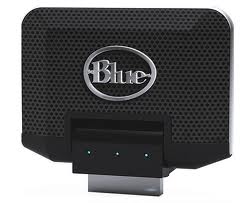
Blue Mikey
I haven't decided how I really feel about this thing yet. On the one hand, it's pretty clear audio. And it does pick up more than the phone's internal mic. But on the other hand... it's still no stick mic.First of all, the thing didn't work with the 4G phones. It caused them to spaz out and continually pop up an error message. It still did that with my 3G, but after acknowledging this once, it quit with my phone. Still, it would literally not be possible to use the mic with a 4G, so that already cuts into its usability and overall performance.
Now, the mic is pretty easy to use, assuming you are able to. Plug it into the bottom of the phone. It works with any application. Where things get interesting is in figuring out what kind of setting to use. There's a small switch on the bottom of the device that you can flick to select between the setting denoted by one wavy strip of bacon (probably airwaves, but really... it looks like bacon), two strips of bacon, stacked on top of each other, or three strips of bacon, a la IHOP style. The setting using one bacon is the equivalent of turning your volume down, so that you don't over-modulate. As you can imagine, increasing the bacon means your captured volume will be louder. However, whe you increase the bacon to get an interview to come through clearly, you also get some REALLY loud background noise. The mic picks up in 360 degrees, so you can't direct it. And if you're using a tripod, don't even bother with the thing, because it isn't going to pick up an interview any better than the internal mic.
Saturday, October 9, 2010
Monle
Friday, October 8, 2010
Review: 1stVideo
Now, at first, it seemed like an incredibly time consuming process. I assumed I would need to go clip by clip and trim them all before I could drop them into a timeline. This was my fault for not understanding how the application works. I'm sure it probably saved me a little time in the REAL editing phase, but it doubled my clips and took about an hour before I even so a timeline, at which point I commenced to cut and clip things without regard for my earlier trimming. Once you start a new project, though, this baby shines.
The video editing section of 1st Video just WORKS. My fingers are a little big, so sometimes it got frustrating trying to snag the indicator, but once I got the hang of it I was zooming. Plus, the feature where you can tap the screen with two fingers to enter into a menu of abilities, chief among these being copy, paste and cut was a godsend. It was intuitive, worked where I needed it to, and didn't bite back too many times. I say too many times because I found myself cursing after five minutes of getting exactly the right selection, only to skip the drag and drop stop and insert the entire clip into my timeline. Aligning sound was also a cinch, although something weird was going on with my leveling. Still, I took to it with the attitude that, if I repeated my command enough times, the program would eventually become agreeable. A little tyrannical, maybe, but overall effective.
Thursday, October 7, 2010
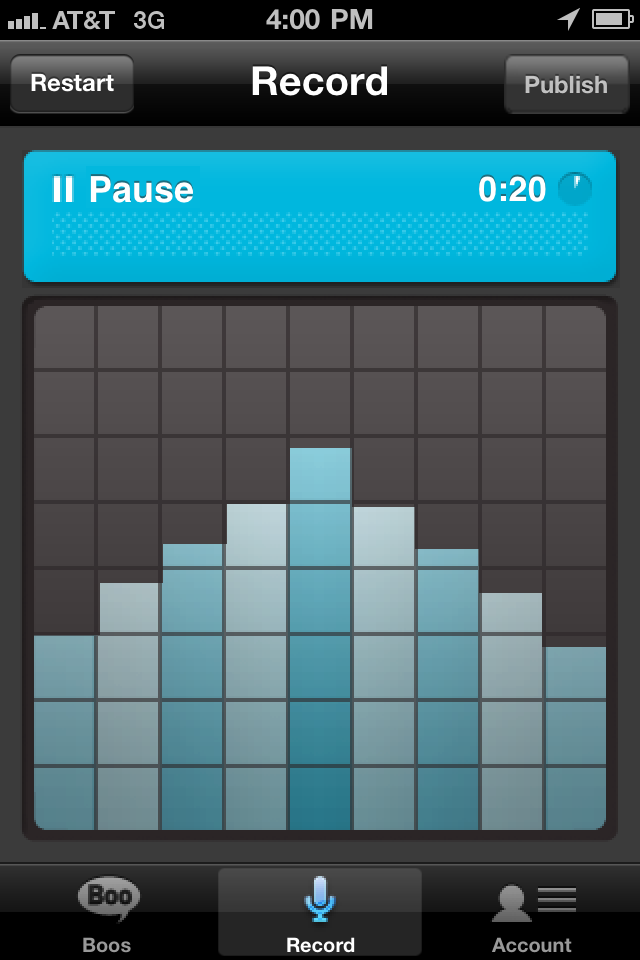
AudioBoo
Radio personalities, show hosts and musicians mostly use the application right now. It’s not widely used in certain areas, so the selection of Boos you can listen to is small. In a bigger city you would have more of a chance to hear interesting and diverse Boos.
You cannot edit on AudioBoo, so once you press “Publish” you have to be ready for your recording to hit the social media waves. I highly suggest checking it out; it’s a good tool to use to promote an event before or, as it is happening. For breaking news it has the potential of being a tool used by journalists as they are covering the story. People could turn to this application for current stories breaking in different parts of the world. It has the potential of being more intense, informational, and engaging as Twitter.
Monday, October 4, 2010
Review: ReelDirector
Another reason applications such as 1stVideo and iMovie, as well as traditional film editing tools, blow ReelDirector out of the water is the should-be simple action of cutting clips. You cannot watch the clip while editing – you have to just guesstimate and hope that you didn’t cut off something important. I was forced to memorize the raw videos and look for visual cues.
Sunday, October 3, 2010
Roots 'N Blues 'N BBQ 2010
(1) This video was made in several different programs. The audio was recorded and edited in VC Audio Net from VeriCorder. It was then made in ShowCase under the 1stVideo application, also by VeriCorder.
roots run from Jennifer Elston on Vimeo. Roots Run - Half-Marathon and 10K (October 2, 2010)
I didn't like the limited drag and drop possibilities with the pictures. They were pretty much stuck after they were placed in the timeline. I did, however, love the the multi-track editing with VC Audio. It was uploaded via the USB cord from the iPhone to Vimeo.(2) The sound to this video was also edited with VC Audio Net, but the final presentation was edited with ReelDirector. ReelDirector's simple interface is perfect for sound slideshow presentations. Click here to read Jennifer's review of ReelDirector. It was uploaded via the Dropbox application and then placed on YouTube to test out different video hosting sites. The slideshow is a little unconventional for a journalism product because there is no caption function, only supers with a couple of words can be placed over the video.